Enabling IP security camera alarm audio is a practical way to enhance real-time deterrence and event awareness. In this guide, we explain how to turn on alarm audio on VIKYLIN PG Series security cameras using the camera’s web interface, following a clear and accurate configuration process.
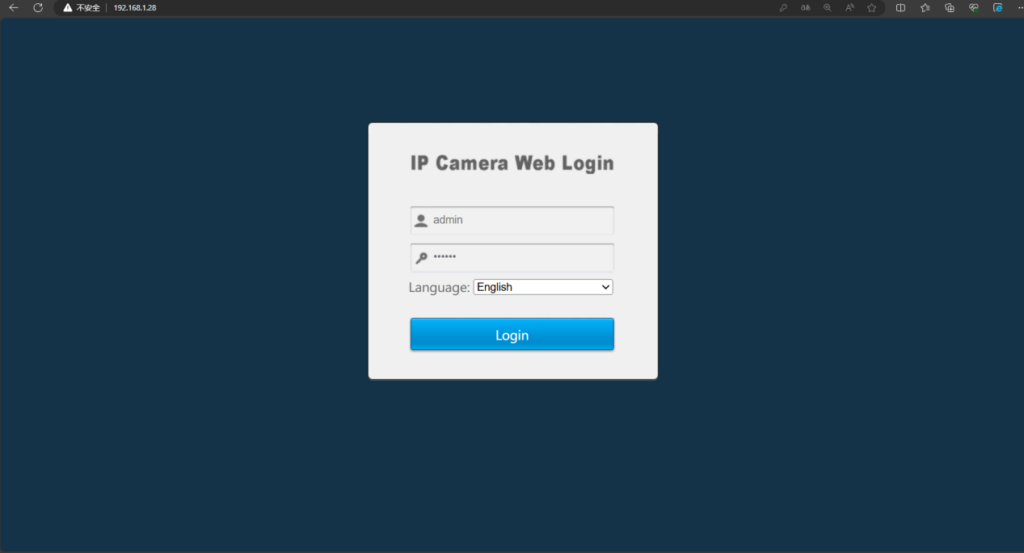
Step 1: Access the Camera Web Interface
Before enabling alarm audio, you need to log in to the camera’s web interface.
Network Connection
Connect the camera using one of the following methods:
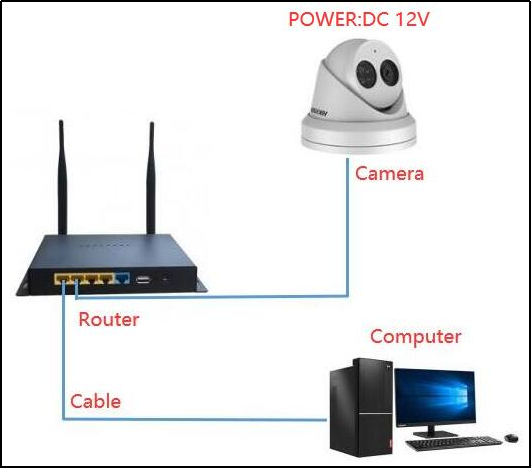
- Connect the camera directly to a computer
- Connect the camera and computer to the same switch or router on the same LAN
Device Discovery
- Download and install AjDevTools on your computer
- Launch the software and search for the camera
- Locate the camera’s IP address in the device list
- Right-click the camera IP address to open the camera’s web interface
- After completing web access, plug the camera into the NVR PoE port
Download address: http://ourdownload.store/AjDevTools_V5.7.2_20230825.exe
This step ensures the camera is properly accessed and configured before being connected to the NVR.
Step 2: Enable Intelligent Detection and Alarm Audio
Once logged in to the camera web interface, follow these steps carefully.
Navigate to Intelligent Detection
- Click Configuration – Event – Intelligent Detect
- Change the camera Status to Enable
- Set Arming Setting to All Day Deployment
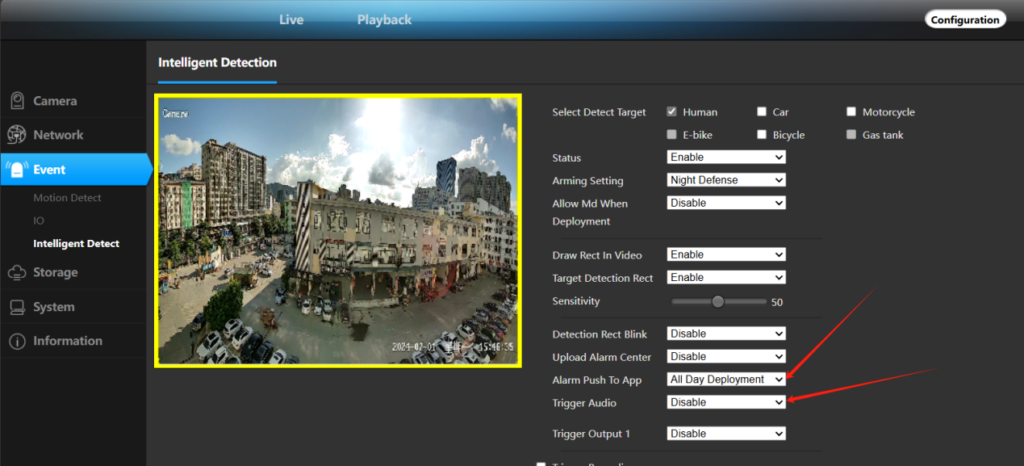
These settings ensure the camera remains active and responsive at all times.
Alarm Function Configuration
Within the same Intelligent Detect menu, configure the alarm actions as needed:
Alarm Push to App
- Trigger: Push alarm messages to mobile phones, sends alarm notifications and alarm videos when an event is triggered
- Trigger Audio: The camera will sound an audible alarm when an event is triggered, enabling Trigger Audio allows the VIKYLIN PG Series security camera to actively deter intrusions through sound alerts.
Why Use Alarm Audio on Security Cameras?
Using alarm audio improves on-site response and adds an extra layer of protection. Combined with intelligent detection, the camera reacts immediately to defined events, helping reduce false alarms while increasing deterrence effectiveness. This makes the VIKYLIN PG Series camera alarm audio feature suitable for both commercial and residential surveillance environments.
About VIKYLIN
VIKYLIN is a professional security devices manufacturer. We focus on delivering reliable camera products with stable performance, clear imaging, and practical alarm functions. Our PG Series cameras are designed for easy deployment, flexible integration with NVR systems, and dependable long-term operation.
Conclusion
Turning on alarm audio for VIKYLIN PG Series security cameras is a straightforward process when configured through the camera web interface. By enabling intelligent detection, all-day arming, and audio triggering, users can significantly improve real-time security response.
If you are looking for intelligent detection security camera or need detailed product price and specifications, please contact VIKYLIN directly. Our team is ready to support your surveillance project and provide competitive quotations.